


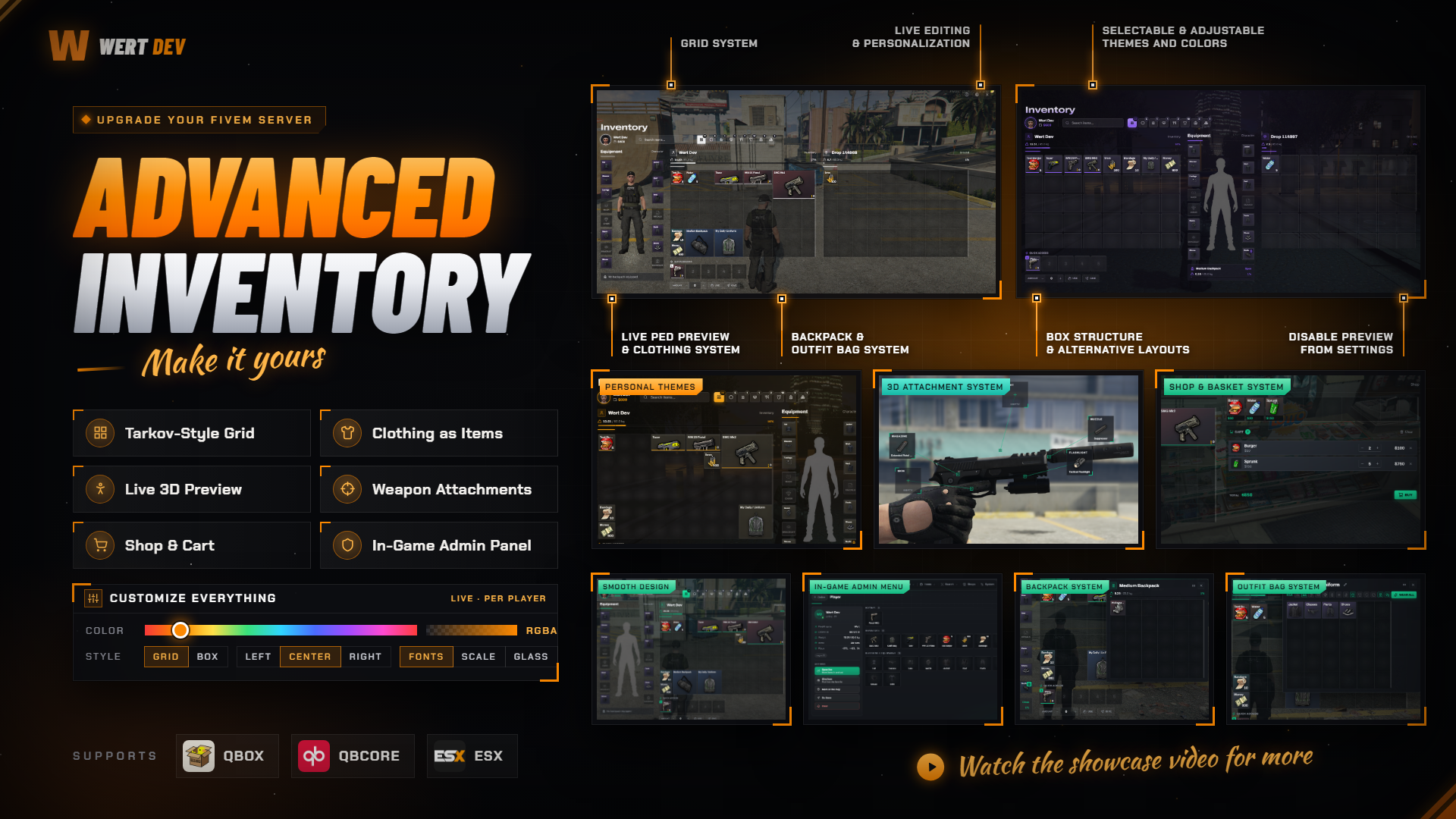
# 🎒 Advanced FiveM Inventory – The Complete Inventory Experience
Give your server the inventory it deserves. **Advanced FiveM Inventory** turns ox_inventory into a grid style
inventory: a Tarkov-style grid where every item has its size, clothing that lives as real items on your character, a
live 3D character preview, a cinematic weapon attachments menu, weapons worn on the body, a shopping cart and a
complete in-game admin panel. From in game customize menu every detail can be personalize also if u dont want grid system of course u can choouse other strectures from settings check video for all.
Every original ox_inventory export, hook and item keeps working, so your existing scripts don't need to change.
Configure everything from clear config files or straight from the in-game admin panel, with no SQL and no restarts.
## 🌟 Why Choose Wert Scripts?
**Premium Interface:** A modern full-screen UI with themes, colors, fonts and layout each player can tune for themselves.
**Fully Customizable In Game:** A built-in settings menu lets every player change the layout, style and every visual
detail of their inventory in seconds, with a live preview. No config files, no restarts.
**Drop-In Replacement:** Built on ox_inventory. Every original export, hook and item definition works as before.
**Zero Setup Integrations:** Clothing resources and weapon packs are detected automatically. You don't edit other
scripts.
**Server-Side Security:** Moves, attachments, purchases, throws and admin actions are all validated on the server.
## 🚀 Features
### 🧩 Grid Inventory
- Tarkov-style grid: every item takes its own space (rifle 4×2, pistol 2×1, backpack 2×2...).
- Weapon sizes are matched by name patterns, so new weapon packs get the right size automatically.
- Players can switch their own inventory between the **grid** and a classic **box** layout, applied instantly.
- 5 quick access slots with their own hotbar HUD.
- Category filters (weapons, ammo, medical, food, clothing, bags) and search.
- The ground panel hides itself when nothing is nearby; drag an item off the panel to drop it.
### 👕 Clothing as Items
- 15 equipment slots: hat, glasses, earrings, mask, chain, watch, jacket, shirt, vest, decals, gloves, pants, shoes,
bracelet, backpack.
- Every piece of clothing is a real item: take it off, trade it, store it, sell it.
- Dressing animations per slot, played on the character and the preview.
- Gloves layered over the jacket's arms, the way GTA really draws them.
- Existing characters keep their outfit: worn clothes are turned into items automatically on first login.
### 🛍️ Clothing Shop Integration
- **illenium-appearance** and **qb-clothing** supported out of the box, detected automatically.
- **No edits to your clothing script**: the inventory listens to its own events.
- Bought clothes become items, and the old outfit goes into an **outfit bag**.
- Wardrobe and job outfits stay visual only.
- Changes made in the inventory are saved back, so removed clothes never return after a relog.
- Any other clothing script (paid ones included) connects with a few documented exports.
### 🎒 Backpacks & Outfit Bags
- Backpacks with their own storage, opened in a separate window.
- Backpacks are shown on the character's back.
- Outfit bags hold one piece per clothing slot: a full outfit in one item.
### 🧍 Live Character Preview
- A 3D copy of your character between the equipment slots, updated live as you dress.
- Drag to rotate it, with an idle animation of your choice.
- Choose its position (left / centre / right) and tilt the side panels for a 3D look.
- Waits for you to stop when the inventory is opened while running or driving, with a clean loading state.
- Can be turned off per player, or for the whole server.
### 🔧 Cinematic Weapon Attachments
- Right click a weapon → **Attachments**: your character raises the weapon and a camera moves next to it.
- Attachment points (sight, muzzle, flashlight, grip, magazine, skin) are drawn right on the weapon model.
- Drag and drop attachments onto the weapon, and back off again.
- One per type, swapping automatically; everything is checked on the server.
- **Weapon packs are detected automatically**: compatibility is read from their weapons.meta, with no lists to maintain.
### 🔫 Worn Weapons
- Weapons in your inventory are shown on your body: rifles on the back, pistols on the waist or thigh holster.
- Job-based rules, e.g. police carry their rifle on the chest and their pistol in a thigh holster.
- The weapon you put away goes back into the holster.
- Attachments and tints shown on worn weapons.
- Drawn locally for every player, with no networked props and no collision.
### 📦 Carry & Throw
- Heavy items (TVs, safes, boxes) are carried in the hands with animations, and slow you down.
- Throw any item: aim with a live trajectory, adjust the power with the mouse wheel, and it lands as a drop.
### 🛒 Shops & Crafting
- Grid shop with price and stock under every item.
- Shopping cart: buy many items in one checkout.
- Pay with cash or bank.
- Crafting bench interface with recipes, ingredients and duration.
### 🖱️ Smart Item Menu
- Give: amount slider and a list of nearby players with their distance.
- Drop and split with amount sliders.
- Item buttons grouped into clean collapsible sections.
### 🛠️ In-Game Admin Panel
- **Players:** online players and every character, **offline included**. View, open live, give, remove, wipe,
teleport.
- **Offline delivery:** items given to offline characters are delivered on their next login.
- **Storage:** stashes, vehicle trunks and gloveboxes, items on the ground.
- **Items:** full item catalog by category. Give to many players at once, with metadata.
- **Weapons with attachments:** give a weapon with attachments already on it, listing only the ones that fit it.
- **Search:** find any item or serial number across every inventory, plus a **duplicate (dupe) scanner**.
- **Live content:** create new items, shops and stashes in game, live for everyone with no restart. Pick their
location in game.
- **Shop editor:** prices, stock, currency, order, items.
- **Item editor:** change the name, weight, size, category and stacking of any existing item.
- **System switches:** worn weapons and preview on/off for everyone, maintenance lock, save all.
- Roles with ACE permissions and identifiers, 10 separate permissions.
- Discord webhook logs for every admin action.
### 🎨 In-Game Settings Menu – Personalize Everything
Every player opens the settings menu right inside the inventory and makes it their own. Changes show live while you
edit, are saved with one click, and are kept per player. Leaving without saving reverts everything.
**Layout**
- Inventory structure: Tarkov-style **grid** or classic **box** slots, switched instantly.
- Character preview position: **left, centre or right**.
- Panel tilt for a 3D look.
- Spacing below the header and between the columns.
- Item notification position: 8 spots on the screen.
- Drop spot highlight on/off.
**Style**
- Ready-made **theme presets**, one click to apply.
- Full **RGBA color control**: accent, panels, item boxes, empty slots, screen background, text, secondary text.
- Frosted glass effect, accent glow, item tint by category.
- Title and text **fonts**.
- Interface **scale**, corner radius, grid lines, animations.
**Details**
- Show or hide item names and weights.
- Tooltip delay.
- Character preview on/off.
- Game world blur on/off.
- Reset to defaults at any time.
Plus a built-in illustrated **guide window** that teaches new players the controls and features.
### 🔌 Developer Friendly
- All original ox_inventory exports and hooks.
- New exports for clothing, equipment slots, backpacks, outfit bags, the player card, carried items and worn
weapons.
- Every command can be turned on/off with its permission set in one file.
- Full documentation.
## 📦 Requirements
- ox_lib
- oxmysql
- OneSync
- Qbox or QBCore or ESX or ox_core
- Optional: illenium-appearance or qb-clothing, MugShotBase64 (character photo)
## ⚙️ Configuration
- `data/` — items, weapons, grid sizes, equipment slots, preview, attachments, worn weapons, carry, throw, commands.
- `config/admin.lua` — admin roles, permissions and Discord webhook (server-side only).
- `locales/*.json` — language files.
## ▶️ Preview
Watch the video showcase to explore the interface and features:
https://www.youtube.com/watch?v=kBkRFjKaMHw
## 🌐 Localization
English and Turkish included. More languages can be added through the locale files.
## 📖 Documentation
https://wert-dev.gitbook.io/wert-dev-docs/